Are you a current Collaborative Classroom customer looking to log into the Learning Portal?
Click here to access the Learning Portal login page.
Your Digital Home for Successful Implementation
Your Collaborative Classroom program is both a print and digital solution.
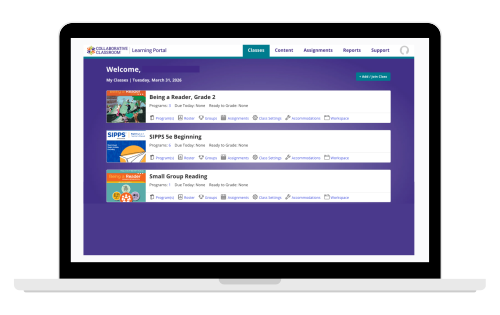
Educators access digital resources via a subscription-based license to the Learning Portal—an intuitive digital environment that brings together core instructional materials, planning tools, assessments, professional learning, and more.
A Seamless, Streamlined Teaching Experience
The Learning Portal organizes instruction the way educators teach, keeping resources seamlessly connected and instruction effective and focused, with:
- A streamlined teaching experience: Plan and deliver instruction using digital lessons and integrated resources
- Point-of-use design: Videos, projectables, and formative assessments are organized so they are exactly where you need them
- One-click access to student-facing lesson content
- Interactive assessments: Easily capture assessment data and use it to inform next steps
- Layered guidance in each lesson: Quick refreshers, instructional insights, and point-of-use scaffolds support educators at every step
- 24/7 instructional support: Get your implementation questions answered immediately by our proprietary CC AI Assistant
An essential tool for high-quality instruction and successful implementation, the Learning Portal ensures that educators teach confidently and students thrive.
Optional Tech SSO/Roster Management
In addition to the features provided to licensed Learning Portal users, Collaborative Classroom offers the
option to add Tech SSO/Roster Management for a one-time fee of $1500/district.
Tech SSO/Roster Management includes the following expanded tools and features:
Single sign-on (SSO) simplifies teacher access, streamlines login and password management, and links teachers to district or third-party portals and other learning management systems.
Auto-provisioning allows for seamless creation of educator Learning Portal accounts. Accounts are automatically activated with the first visit to the Learning Portal.
We support these SSO protocols:
- SAML 2.0, OpenID Connect (OIDC), Google, Microsoft ASFS/Azure
- Various third-party Identity Management systems
We have SSO integrations to ClassLink LaunchPad and other SAML-based platforms
Automatic roster management synchronizes school rosters via Collaborative Classroom–managed CSV upload.
- We currently support roster management with any source system (e.g. ClassLink, SiS) using OneRoster 1.1/1.2 formatted CSV files transmitted via Secure File Transfer Protocol to our secure servers.
- We also support our own native file formats which can be generated via Excel or other CSV tools.
Try It Out
Considering a Collaborative Classroom program? Get a 60-day digital trial.